Limit Response Data Rate
The Limit Response Data Rate action controls the response transfer rate for matching requests, preventing a single download, large-file response, or persistent connection from consuming excessive outbound bandwidth. This action controls the rate of data returned to the client; it does not limit how frequently the client sends requests. It is therefore an extended traffic protection capability for CC protection.
Use Cases
- Limit bandwidth consumption by download endpoints or large-file responses.
- Set different transfer rates for traffic based on the URI, client, or other conditions.
- Prevent a small number of large responses from affecting other users when bandwidth is limited.
To limit how frequently clients send HTTP requests, use Limit Request Rate or Limit Request Count.
How It Works
When a request matches the page rule, OpenResty Edge sends response data to the client at the configured rate. Rule conditions can limit the action to particular client IP addresses, URIs, or other criteria. Responses that do not match the rule are unaffected.
Configuration
- In Edge Admin, open the Page Rules page for the target application and create a rule.
- Configure URI, client information, or other conditions as needed.
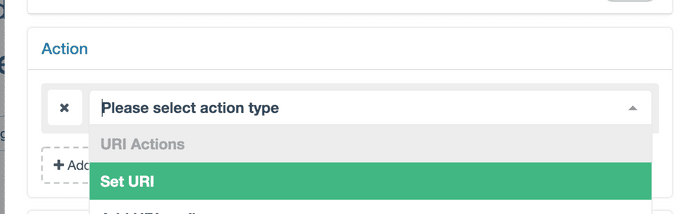
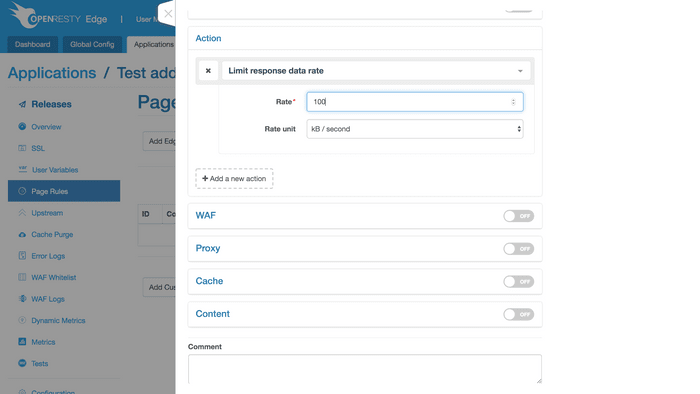
- Under Actions, select Limit Response Data Rate.
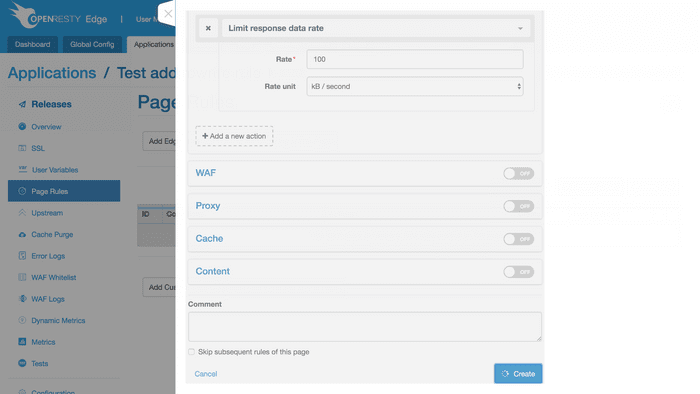
- Set the rate and rate unit, create the rule, and publish the application configuration.
Parameters
- Rate: The rate at which response data can be sent to the client.
- Rate Unit: The time and data units for the rate, such as KB per second or MB per minute.
Verification
After publishing the configuration, download a test file large enough to make the transfer rate observable and record the average download rate reported by the client. Test both matching and non-matching requests to confirm that the rate limit applies only to the intended traffic.
Considerations
- Small responses may complete too quickly for the rate limit to be apparent. Use a larger test response for verification.
- Setting the rate too low prolongs connections, increases concurrent connection usage, and directly affects the download experience.
- Tune the rate gradually based on available bandwidth, response sizes, and concurrency. Do not use response data rate limiting as a substitute for request frequency controls.